
Medical Alert Systems for Seniors
Medical Alert Systems for Seniors: The Complete Safety and Buying Guide for 2025
Written & Reviewed by


Last updated:
Emergency Information First
If you’re experiencing a medical emergency right now:
- Call 911 immediately
- If you have chest pain, difficulty breathing, severe bleeding, or loss of consciousness, don’t wait for a medical alert system
- Have someone stay with you until help arrives
If you’ve fallen and can’t get up:
- Try to stay calm and assess if you’re injured
- If you have a medical alert device, press the button now
- If not, try to reach a phone or call for help
- Don’t attempt to get up if you suspect serious injury
Emergency Contacts to Keep Handy:
- Emergency Services: 911
- Your doctor: ________________
- Nearest hospital: ________________
- Trusted family member: ________________
- Poison Control: 1-800-222-1222
Key Takeaways
✅ One in four seniors falls each year – according to the CDC, over 14 million seniors fall annually ✅ Medicare generally does NOT cover medical alert systems, but some Medicare Advantage plans do ✅ Response times matter – top systems connect you to help in 15-60 seconds ✅ Monthly costs range from $25-70 for legitimate monitored systems ✅ Fall detection isn’t perfect – but it can be lifesaving when it works ✅ Professional monitoring is essential – DIY systems won’t call 911 for you
What Are Medical Alert Systems and Why Do Seniors Need Them?
Medical alert systems, also called Personal Emergency Response Systems (PERS), are lifeline devices that connect you to emergency help 24/7 with the push of a button. When you press the button, you’re immediately connected to a trained operator who can assess your situation and dispatch help if needed.
The Sobering Reality About Senior Falls
According to the Centers for Disease Control and Prevention:
- 14+ million seniors fall each year (1 in 4 adults over 65)
- 37% of falls result in injuries requiring medical treatment
- Over 41,000 seniors died from falls in 2023
- Fall-related medical costs exceed $35 billion annually
But here’s what’s most important: most seniors who fall and can’t reach help quickly lose their ability to live independently. The “golden hour” after a fall is critical – getting help within 60 minutes can be the difference between recovery and permanent disability.
How Medical Alert Systems Actually Work
When you press your emergency button:
- Instant connection to a 24/7 monitoring center (usually within 15-60 seconds)
- Trained operator assesses your situation through two-way communication
- Emergency contacts notified (family, friends, or neighbors)
- 911 dispatched if needed with your exact location and medical information
- Follow-up ensures you received proper help
Reality Check: This only works with legitimate monitored services. Cheap devices that just call your family won’t save your life if everyone’s at work or asleep.
Types of Medical Alert Systems: Understanding Your Options
| System Type | Best For | Monthly Cost | Pros | Cons |
|---|---|---|---|---|
| Home-Based | Seniors who stay home mostly | $25-40 | Longer battery life, less expensive | Limited to home range |
| Mobile/GPS | Active seniors who go out | $35-60 | Works anywhere with cell service | Higher cost, shorter battery |
| All-in-One | Seniors wanting both options | $45-70 | Home and away protection | Most expensive |
| Smartwatch | Tech-comfortable seniors | $50-80 | Modern look, health tracking | Complex setup, expensive |
Home-Based Systems
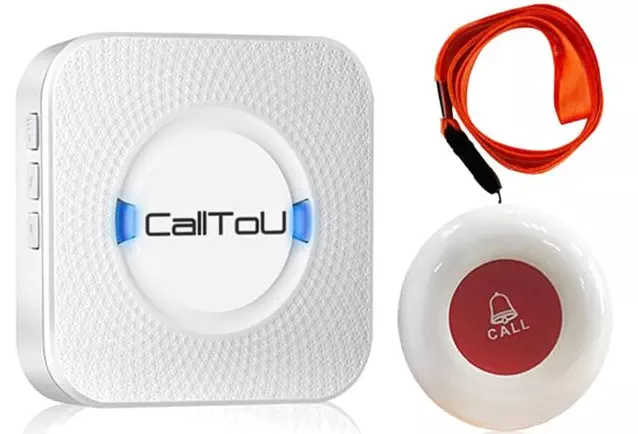
These include a base station plugged into your wall and a wearable button. The base station connects to your phone line or internet and has a powerful speaker so you can talk to operators from across the room.
Range: Usually works 300-600 feet from the base station (varies by brand) Best for: Seniors who spend most time at home and have good landline or internet service
Mobile/GPS Systems
These are wearable devices with built-in cellular service and GPS tracking. They work anywhere with cell phone coverage and can pinpoint your exact location for emergency responders.
Coverage: Works anywhere with cellular service (usually nationwide) Best for: Active seniors who drive, walk, travel, or spend time away from home
Reality Check: What Medical Alert Systems Cannot Do
Medical alert systems CANNOT:
- Prevent falls or medical emergencies
- Replace proper medical care or regular checkups
- Work without cellular service or power (mobile systems)
- Guarantee emergency responders will arrive in time
- Work if you’re unconscious (unless they have fall detection)
They CAN:
- Dramatically reduce the time you wait for help
- Provide peace of mind for you and your family
- Connect you to help 24/7, even on holidays
- Automatically call for help if fall detection works properly
- Store your medical information for emergency responders
Our Top 8 Medical Alert Systems for Seniors in 2025
1. Bay Alarm Medical – Best Overall Value
Monthly Cost: $24.95-49.95
Setup Fee: $49.95
Response Time: 16 seconds average
Weight Capacity: No limit listed
Bay Alarm Medical consistently receives top ratings for response time, customer service, and value. They offer both home and mobile systems with optional fall detection. Their monitoring centers are located in Utah and Idaho, staffed 24/7.
Where to Buy: Bay Alarm Medical
Best For: Budget-conscious seniors wanting reliable service, first-time users
2. Medical Guardian – Most Advanced Technology
Monthly Cost: $29.95-69.95
Setup Fee: $99.95
Response Time: 8 seconds average
Special Features: Smartwatch options, health tracking
Medical Guardian offers the most advanced technology with smartwatch options, health monitoring, and sleek designs. They were among the first to offer truly wearable medical alert watches that look modern.
Where to Buy: Medical Guardian
Best For: Tech-savvy seniors, those wanting modern-looking devices
3. ADT Medical Alert – Most Trusted Brand
Monthly Cost: $27.99-49.99
Setup Fee: $99
Response Time: 15-30 seconds
Background: 150+ years in security industry
ADT brings decades of security experience to medical alerts. Their systems integrate with home security if desired, and they have an extensive network of monitoring centers.
Where to Buy: ADT
Best For: Seniors who value brand recognition, those with existing ADT services
4. Lively (formerly GreatCall) – Best for Seniors with Hearing Issues
Monthly Cost: $24.99-49.99
Setup Fee: $79.99
Response Time: 20-40 seconds
Special Features: Health and safety packages, urgent care access
Lively specializes in senior-friendly technology with extra-loud speakers and simple operation. They also offer health and safety packages with nurse access.
Where to Buy: Lively
Best For: Seniors with hearing difficulties, those wanting health services
5. MobileHelp – Best Mobile Coverage
Monthly Cost: $24.95-59.95
Setup Fee: $49.95
Response Time: 25-45 seconds
Coverage: Nationwide AT&T network
MobileHelp focuses on mobile systems with excellent GPS accuracy and nationwide coverage. Their mobile devices work well for active seniors who travel.
Where to Buy: MobileHelp
Best For: Active seniors, frequent travelers, those living in rural areas
6. Lifeline by Philips – Most Established
Monthly Cost: $39.95-69.95
Setup Fee: $75
Response Time: 30-50 seconds
History: Original inventor of medical alert systems
Lifeline invented the medical alert industry and has decades of experience. They offer traditional reliability with modern features and excellent fall detection.
Where to Buy: Lifeline
Best For: Seniors preferring established brands, those needing fall detection
7. Life Alert – Most Advertised (But Not Recommended)
Monthly Cost: $70-90+
Setup Fee: $95-200
Response Time: 30-60 seconds
Contract: Requires 3-year agreement
Why We Don’t Recommend Life Alert: Despite heavy advertising, Life Alert requires expensive 3-year contracts, has pushy sales tactics, and costs significantly more than comparable services. They don’t offer fall detection and have slower response times than our top picks.
Better Alternative: Any of our top 6 recommendations offer better value and service.
8. Medical Care Alert – Best Budget Option
Monthly Cost: $19.95-39.95
Setup Fee: $29.95
Response Time: 45-90 seconds
Features: Basic service, no contracts
A no-frills option for seniors on tight budgets. While not as feature-rich as premium services, they provide basic emergency response at the lowest cost.
Where to Buy: Medical Care Alert
Best For: Extremely budget-conscious seniors, those needing basic service only
Detailed Comparison: Features That Matter to Seniors
| Feature | Bay Alarm | Medical Guardian | ADT | Lively | MobileHelp | Lifeline |
|---|---|---|---|---|---|---|
| 24/7 Monitoring | ✅ | ✅ | ✅ | ✅ | ✅ | ✅ |
| Fall Detection | ✅ (+$10) | ✅ (+$15) | ✅ (+$15) | ✅ (+$15) | ✅ (+$10) | ✅ (included) |
| GPS Tracking | ✅ | ✅ | ✅ | ✅ | ✅ | ✅ |
| Water Resistant | ✅ | ✅ | ✅ | ✅ | ✅ | ✅ |
| No Contracts | ✅ | ✅ | ✅ | ✅ | ✅ | ✅ |
| Caregiver App | ✅ | ✅ | ✅ | ✅ | ✅ | ✅ |
| Battery Life | 7-30 days | 5-7 days | 7-14 days | 3-5 days | 5-10 days | 7-30 days |
| Senior Rating | ⭐⭐⭐⭐⭐ | ⭐⭐⭐⭐⭐ | ⭐⭐⭐⭐ | ⭐⭐⭐⭐ | ⭐⭐⭐⭐ | ⭐⭐⭐⭐ |
What Fall Detection Really Means
Fall detection uses sensors to automatically call for help if you fall, even if you can’t press the button. However, it’s not perfect:
Fall Detection Accuracy:
- Detects actual falls: 75-85% of the time
- False alarms: 5-15% of incidents
- Works best for: Hard falls onto floors
- May miss: Slow falls, falls onto soft surfaces, falls while sitting
Reality Check: Fall detection is helpful but shouldn’t be your only safety plan. You still need easy access to your emergency button.
Medicare and Insurance Coverage: What Seniors Really Need to Know
The Truth About Medicare Coverage
Original Medicare (Parts A and B) does NOT cover medical alert systems because they’re not considered “durable medical equipment” like wheelchairs or oxygen tanks.
Medicare Advantage (Part C) sometimes does. Some private Medicare Advantage plans offer medical alert system coverage as an extra benefit. Coverage varies widely:
- Some plans: Cover 100% of costs
- Other plans: Cover $25-50 per month toward costs
- Most plans: Don’t cover medical alert systems at all
Other Insurance Options
| Insurance Type | Typical Coverage | What to Ask |
|---|---|---|
| Long-term Care Insurance | Often covers 50-100% | “Do you cover PERS devices and monitoring?” |
| Medicaid | Varies by state | “Is PERS covered under HCBS waivers?” |
| TRICARE for Life | Sometimes covers | “What medical alert benefits are included?” |
| Private Insurance | Rarely covers | Check your benefits summary |
Ways to Reduce Costs
AARP Discounts: Many companies offer 10-15% discounts to AARP members Veteran Benefits: VA may provide free systems for eligible veterans HSA/FSA Funds: Use pre-tax dollars to pay for medical alert systems Family Plans: Some companies offer multi-user discounts Annual Payment: Pay yearly instead of monthly for 10-20% savings
Cost Breakdown: What Seniors Actually Pay
First-Year Costs Comparison
| Company | Setup Fee | Monthly Fee | Fall Detection | Total Year 1 |
|---|---|---|---|---|
| Bay Alarm | $49.95 | $24.95 | +$10 | $469.35 |
| Medical Guardian | $99.95 | $29.95 | +$15 | $639.35 |
| ADT | $99 | $27.99 | +$15 | $614.88 |
| Lively | $79.99 | $24.99 | +$15 | $559.87 |
| MobileHelp | $49.95 | $24.95 | +$10 | $469.35 |
| Lifeline | $75 | $39.95 | Included | $554.40 |
Hidden Costs to Watch For
Shipping Fees: $10-25 (should be free) Activation Fees: $25-50 (often waived) Cancellation Fees: $0-100 (avoid companies that charge these) Equipment Replacement: $50-150 (if you damage the device) Extra Features: $5-20/month each (medication reminders, spouse monitoring)
Money-Saving Tip: Ask about military, senior, or AARP discounts before signing up. Many companies offer them but don’t advertise them prominently.
How to Choose the Right System for Your Needs
Step 1: Assess Your Lifestyle
Ask yourself:
- Do I spend most time at home or am I often out?
- Do I have reliable landline or internet service?
- Am I comfortable with technology?
- What’s my budget for monthly costs?
- Do I have family nearby who can respond quickly?
Step 2: Consider Your Health Conditions
| Health Condition | Recommended Features |
|---|---|
| History of Falls | Fall detection, fast response times |
| Heart Conditions | GPS tracking, medical info storage |
| Diabetes | 24/7 monitoring, medication reminders |
| Dementia/Alzheimer’s | GPS tracking, wandering alerts |
| Hearing Loss | Loud speakers, vibrating alerts |
| Vision Problems | Large buttons, voice prompts |
Step 3: Test Before You Commit
Questions to Ask During Trial:
- How quickly do operators respond?
- Can I understand them clearly?
- Is the button easy to press?
- Does it work throughout my home/yard?
- Is the caregiver app easy for my family to use?
Step 4: Read the Fine Print
Red Flags to Avoid:
- Long-term contracts (3+ years)
- High cancellation fees
- Pushy sales tactics
- No trial period
- Vague pricing information
- Poor customer service reviews
Installation and Setup: What to Expect
Home-Based System Setup
What the technician will do:
- Test your phone line or internet connection
- Install the base station in a central location
- Test the range throughout your home
- Program emergency contacts and medical information
- Show you how to use all features
- Test the system with a practice call
Timeline: 30-60 minutes for professional installation
Mobile System Activation
Self-setup process:
- Charge the device fully (2-4 hours)
- Call activation number provided
- Test GPS accuracy outside your home
- Add emergency contacts and medical info
- Download caregiver app if applicable
- Test the system with a practice call
Timeline: 15-30 minutes if you’re comfortable with technology
Common Setup Problems
Weak cellular signal: May need to change carriers or upgrade service Limited range: Base station may need repositioning False alarms: Fall detection may need adjustment Family app issues: Often require tech support to resolve
Daily Use and Maintenance for Seniors
Making It a Habit
Successful users:
- Wear the device consistently – even in the shower if waterproof
- Keep it charged – set phone reminders for charging
- Test monthly – make practice calls to ensure it works
- Update contacts – keep emergency contact list current
- Tell family – make sure they know how your system works
Battery Maintenance
| Device Type | Battery Life | Charging Frequency | Low Battery Warning |
|---|---|---|---|
| Home Pendant | 30+ days | Monthly | 7-day warning |
| Mobile Device | 5-10 days | 2-3 times/week | 24-hour warning |
| Smartwatch | 1-3 days | Daily | 4-hour warning |
When to Replace Your Device
Replace immediately if:
- Cracks appear in the device
- Water damage occurs (even if “waterproof”)
- Battery won’t hold charge
- System fails to connect during tests
- You experience frequent false alarms
Replace after 3-5 years for:
- Technology upgrades
- Better features becoming available
- Cellular network changes (like 3G shutdown)
Real-World Challenges Seniors Face
Challenge 1: Remembering to Wear It
Problem: Many seniors forget to put on their device, especially when rushed
Solutions:
- Choose a comfortable design you’ll want to wear
- Establish a routine (put on with glasses or medication)
- Ask family to gently remind you
- Consider a smartwatch that does more than emergency response
Challenge 2: False Alarms
Problem: Fall detection triggers when you sit down quickly or drop the device
Solutions:
- Learn the proper way to cancel false alarms (usually 10-30 seconds)
- Adjust sensitivity settings if your device allows it
- Consider turning off fall detection if it’s too sensitive
- Remember: false alarms are better than no alarms
Challenge 3: Family Resistance
Problem: Adult children may resist the monthly cost or think you don’t need it yet
Solutions:
- Share fall statistics with family members
- Start with a trial period to show the value
- Consider splitting costs with family members
- Frame it as independence insurance, not admission of weakness
Challenge 4: Technology Overwhelm
Problem: New devices can feel complicated, especially smartphones apps
Solutions:
- Choose the simplest system that meets your needs
- Ask for extra training during setup
- Have family members learn the system too
- Keep written instructions in large print
Safety Tips Every Senior Should Know
Testing Your System
Monthly test routine:
- Press your emergency button when you’re feeling well
- Tell the operator it’s a test call
- Ask about response time and signal strength
- Verify your information is current and correct
- Test any special features like GPS or fall detection
Emergency Information to Keep Updated
Medical Information:
- Current medications and dosages
- Allergies and adverse reactions
- Medical conditions and chronic illnesses
- Primary care doctor and specialists
- Preferred hospital
Contact Information:
- Emergency contacts (at least 2-3 people)
- Family members and close friends
- Neighbors who might be available quickly
- Backup contacts if primaries aren’t available
When NOT to Use Your Medical Alert
Don’t use for:
- Non-urgent medical questions
- Medication reminders (unless that’s a paid feature)
- Checking in with family
- Technical support issues
DO use for:
- Any situation where you need emergency help
- Falls where you can’t get up
- Chest pain, difficulty breathing, or severe pain
- When you feel unsafe or threatened
- Medical emergencies involving others in your home
FAQs: What Seniors Ask Most
Q: Will Medicare pay for my medical alert system?
A: Original Medicare (Parts A and B) does not cover medical alert systems. However, some Medicare Advantage (Part C) plans do offer coverage or discounts. Check with your specific plan to see what benefits are available. Always consult with your healthcare provider about whether a medical alert system is right for your medical situation.
Q: What happens if I accidentally press the button?
A: Don’t worry – this happens frequently! When the operator answers, simply tell them it was an accidental press and you don’t need help. Most systems give you 10-30 seconds to cancel before connecting to an operator. However, you should always consult your healthcare provider if you’re experiencing frequent confusion or memory issues.
Q: Do medical alert systems work during power outages?
A: Home-based systems typically have backup batteries that last 24-48 hours during power outages. Mobile systems work independently of your home’s power. However, if your internet or phone service is affected, this could impact home systems. Always consult with your healthcare provider about emergency preparedness plans.
Q: Can I use my medical alert system in the shower?
A: Most modern medical alert devices are water-resistant and can be worn in the shower – this is actually recommended since bathrooms are common fall locations. However, you should verify this feature with your specific device and always consult your healthcare provider about bathroom safety measures.
Q: What if I can’t speak when I press the button?
A: Operators are trained to handle situations where you can’t respond verbally. They will typically try to communicate with you first, then contact your emergency contacts, and may dispatch emergency services if they can’t determine your condition. Always discuss your specific medical conditions with your healthcare provider when setting up the system.
Q: How accurate is fall detection?
A: Fall detection technology detects actual falls about 75-85% of the time, with false alarms occurring 5-15% of the time. It works best for hard falls onto floors but may miss slow falls or falls onto soft surfaces. This technology is improving but isn’t perfect, so you should always consult your healthcare provider about the best safety plan for your specific situation.
Q: Can family members track my location?
A: Many systems offer caregiver apps that allow family members to see your location and device status, but only if you give permission. You control what information is shared. However, you should discuss privacy preferences with your family and healthcare provider when choosing a system.
Q: What happens if I travel out of state?
A: Mobile medical alert systems with GPS work nationwide wherever there’s cellular service. Home-based systems won’t work when you travel. You should inform your monitoring service when traveling and always consult your healthcare provider about maintaining safety while away from home.
Resources for Seniors
Government and Health Organizations
- Centers for Disease Control and Prevention – Fall Prevention Information
- National Institute on Aging – Preventing Falls and Related Fractures
- Medicare.gov – Medical Equipment Coverage
Professional Support
- American Geriatrics Society – Guidelines for fall prevention
- National Association of Area Agencies on Aging – Local aging resources
- AARP – Home and Family Safety
Emergency Preparedness
- Ready.gov – Emergency preparedness for seniors
- American Red Cross – Emergency preparedness information
- FEMA – Disaster preparedness resources
Medical Alert Industry Resources
- Electronic Security Association – Industry standards and certification
- Better Business Bureau – Company ratings and complaint information
- Consumer Reports – Independent testing and reviews
Making Your Decision: Your Safety Action Plan
Choosing a medical alert system is an important step toward maintaining your independence and safety. Here’s your action plan:
Step 1: Medical Consultation
- Discuss your fall risk with your doctor
- Review your medications for side effects that increase fall risk
- Get clearance for the physical activity required to use devices
- Ask about referrals to occupational therapy for home safety assessment
Step 2: Family Discussion
- Share fall statistics and your concerns with family
- Discuss who should be emergency contacts
- Review budget and potential cost-sharing
- Plan for device setup and training
Step 3: Research and Compare
- Use our comparison information to narrow your choices
- Check for current promotions or senior discounts
- Read recent customer reviews on multiple sites
- Verify company licensing and Better Business Bureau ratings
Step 4: Trial Period
- Take advantage of trial periods (most offer 15-30 days)
- Test the system thoroughly during the trial
- Involve family members in testing caregiver apps
- Don’t be afraid to return it if it doesn’t meet your needs
Step 5: Long-term Success
- Schedule monthly tests in your calendar
- Keep emergency contact information updated
- Review your system annually for better options
- Share your experience with other seniors who might benefit
Final Thoughts: Your Independence Matters
A medical alert system isn’t an admission that you’re getting old or losing independence – it’s a tool that helps you maintain your independence longer. With the right system, you can continue living in your own home with confidence, knowing that help is always just a button press away.
The statistics about senior falls are sobering, but they don’t have to define your future. By taking proactive steps now, you’re choosing to take control of your safety rather than leaving it to chance.
Remember: The best medical alert system is the one you’ll actually wear and use consistently. Don’t get overwhelmed by features you don’t need – focus on reliable monitoring, fast response times, and a company you trust.
Disclaimer
This article provides general information about medical alert systems for educational purposes only and should not replace professional medical advice. The decision to use a medical alert system should be made in consultation with qualified healthcare professionals such as doctors, nurses, or occupational therapists who can assess your individual needs and medical conditions.
Pricing, features, and coverage information can change frequently. Medicare and insurance coverage details may also change. Always verify current information with Medicare, your insurance provider, and medical alert companies before making purchases. The product recommendations in this article are based on publicly available information, industry standards, and user considerations as of 2025, but individual needs vary significantly.
Emergency response times, fall detection accuracy, and system reliability can vary based on location, equipment condition, and other factors. Medical alert systems are tools to help summon assistance but cannot guarantee emergency response times or prevent all injuries.
Always consult with your healthcare provider before choosing a medical alert system, and report any concerns about your safety or mobility immediately. Medicare Advantage plan benefits and coverage can change annually, so readers should always verify current coverage with their specific plans and healthcare providers.
Last Updated: August 2025
Medical Review: This article has not been reviewed by medical professionals. Always consult your healthcare provider for personalized advice about medical alert systems and fall prevention strategies.
About the Authors