
How ChatGPT Can Help Seniors Find Grants, Benefits, and Assistance Programs
Written & Reviewed by


Last updated: March 19, 2026
Bottom line: ChatGPT can help seniors understand benefit letters, make checklists, write emails, compare options, and prepare for calls about Medicare, Social Security, housing, food, utilities, and other help. It can save time and lower stress, but it should never be your final source for eligibility, deadlines, or legal rights.
Important truth: Most help for seniors is not a direct cash grant. In real life, help often comes as insurance savings, food assistance, utility help, tax relief, rent help, home repair programs, transportation support, or local nonprofit aid. Tools like BenefitsCheckUp, the official USA.gov benefit finder, SHIP Medicare counseling, my Social Security, and the Eldercare Locator are still where the real action happens. ChatGPT helps you use them better.
Start here
Start with one real problem: Do not ask ChatGPT, “What benefits do I get?” That is too broad. Start with one problem such as “I cannot afford my medications,” “I need help with rent,” “I need to understand this Medicare letter,” or “I want to know what programs may help a 72-year-old on Social Security.”
- Pick one problem first. Example: food, rent, Medicare costs, utilities, dental care, home repair, or property taxes.
- Use ChatGPT to prepare. Ask it to explain the issue, list documents, and create questions.
- Then go to the real source. Use an official or high-trust site like BenefitsCheckUp, USA.gov, SHIP, Medicare, or Social Security.
Best first move: If you do not know where to begin, try BenefitsCheckUp or call the Eldercare Locator at 1-800-677-1116. If you need local help with bills or housing, you can also call 211 or use United Way 211.
Key takeaways
- ChatGPT is best used before you apply. It can help you get organized.
- Most senior help is a program, not a grant. Think benefits, discounts, subsidies, waivers, and local aid.
- Do not trust AI alone for eligibility. State, county, and program rules often vary.
- Desktop and laptop use can be easier for seniors. Bigger screens help with long letters, tables, and forms.
- Voice can help if typing is hard. OpenAI supports voice conversations on supported platforms, and both Microsoft and Apple offer dictation tools.
- Use ChatGPT to think, not to decide. Let it explain, summarize, draft, and organize. Then verify the real rule.
What ChatGPT can do well in the benefits and assistance world
ChatGPT is a strong helper for paperwork-heavy problems: OpenAI says ChatGPT can answer questions, summarize information, draft and rewrite text, and help organize work. That fits senior benefits and assistance work very well because most of the pain is not the program itself. The pain is the confusion around it. See the official ChatGPT capabilities overview.
| Task | What ChatGPT can do | What you still need to do |
|---|---|---|
| Understand a benefit letter | Explain it in plain English and turn it into a checklist | Check the original letter for deadlines, amounts, and phone numbers |
| Find possible programs | Suggest categories of help to look for | Use BenefitsCheckUp or USA.gov to search real programs |
| Prepare to call an agency | Write a short question list and phone script | Call the real office and write down the answer |
| Prepare an application | Make a document checklist and timeline | Complete the official application |
| Write an appeal or complaint | Draft a calm, clear letter | Check the facts, dates, and attachments before sending |
| Compare options | Put choices into a simple table | Verify each option with the actual program |
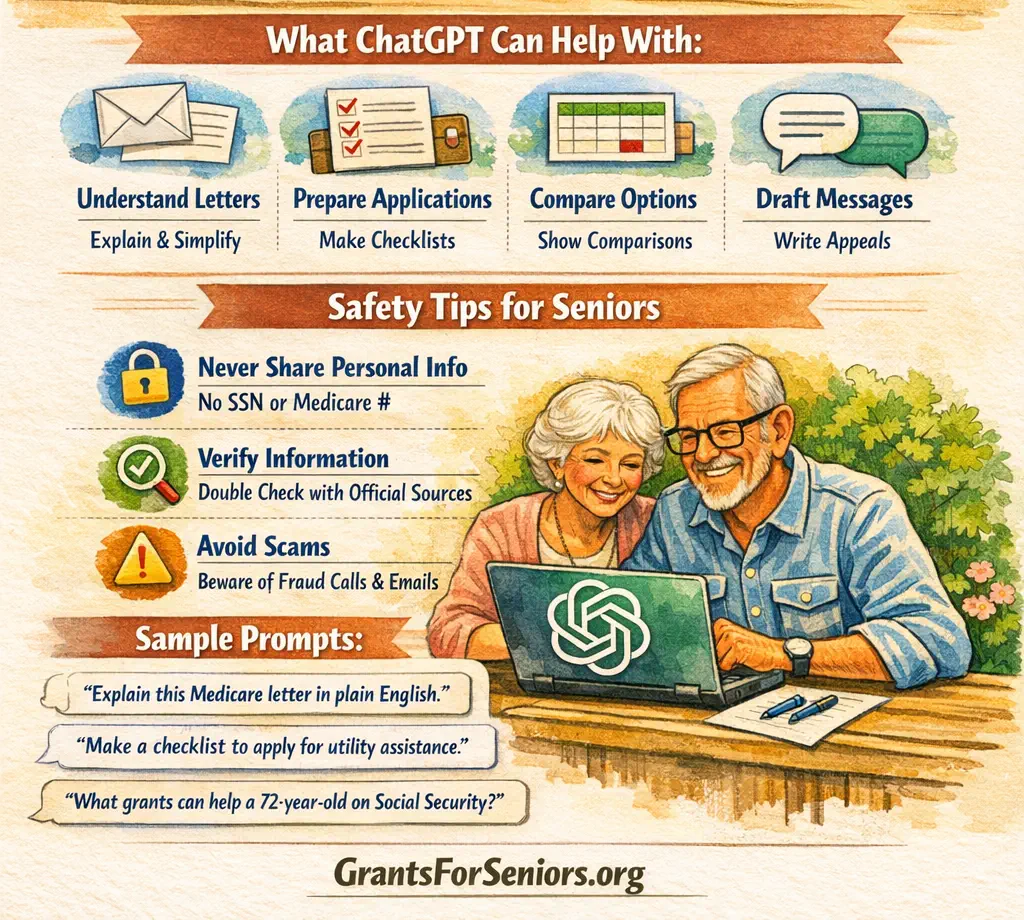
In simple words: ChatGPT helps most with understanding, organizing, drafting, comparing, and planning. It is not a caseworker. It is not a lawyer. It is not the agency.
What ChatGPT cannot do for you
Know the real answer in every case: Benefits rules can change by state, county, age, disability, immigration status, housing type, household size, or timing. ChatGPT can point you in the right direction, but it can still give a wrong answer that sounds smooth.
Submit your application to the real program: It cannot file your SNAP application, approve Medicaid, lower your Medicare premium, or award you a housing voucher.
See your account unless you tell it: It does not know your Medicare account, Social Security record, or utility balance unless you paste information in. And you should not paste sensitive information like your Social Security number, Medicare number, banking details, or full account logins.
Protect you from scams by itself: The Federal Trade Commission warns that AI can make scams more believable, including fake family emergency calls using cloned voices. ChatGPT can help you think through a suspicious message, but you still need to verify using a known phone number or official website.
How to actually use ChatGPT for grants, benefits, and assistance
Use the device you already handle best: Many seniors will do better on a desktop or laptop because long answers, letters, and tables are easier to read there. Tablets can also work well. Phones are useful for quick questions, voice use, and help from a relative or caregiver.
| If you want to do this | Do this | Best device |
|---|---|---|
| Read and compare benefit information | Open ChatGPT in your browser and use a larger screen | Desktop or laptop |
| Use a simpler app layout | Install the official ChatGPT app from the App Store or Google Play | Tablet or phone |
| Talk instead of type | Use voice mode on a supported device | Phone, tablet, or computer with microphone |
| Dictate text into ChatGPT | Use Windows voice typing or Apple Dictation | Any device that supports dictation |
| Keep one long project together | Use Projects to keep related notes, chats, and files in one place | Desktop or laptop |
Simple process:
- Choose one problem. Example: “I need help paying Medicare costs.”
- Ask ChatGPT to explain the issue.
- Ask it to make a checklist.
- Ask what documents you should gather.
- Ask what official source to use next.
- Then go to that official source.
Real-world use cases by income level and life situation
Not every reader is low-income: Some seniors come for urgent benefits. Some come for planning help. Some want to help a spouse, sibling, tenant, or parent. ChatGPT can be useful across all of those cases.
| Senior situation | Main problem | How ChatGPT helps |
|---|---|---|
| Very low-income senior | Needs food, utility, or Medicare cost help fast | Explains notices, builds a survival checklist, prepares benefit screening questions |
| Low-income senior | Confused by drug costs, SNAP, rent, or utility help | Drafts scripts, explains letters, organizes documents, compares help options |
| Moderate-income senior | Needs property tax relief, home repair help, Medicare savings, or rental-gap planning | Builds a cash-flow plan, makes question lists, compares programs and timing |
| Upper-middle-income senior | Needs help navigating care costs, veteran benefits, or support for a spouse or sibling | Organizes notes, prepares questions, drafts outreach messages, compares next steps |
| Higher-income senior | Values time, not just money, and wants cleaner planning | Summarizes long information, drafts professional questions, saves time before meetings |
Very low-income senior using ChatGPT before screening for benefits
- Example: A 74-year-old widow lives alone on Social Security. Her utility bill is late. She is skipping medication because money is short. She does not know whether to look for food help, utility help, Medicare cost help, or all three.
- How ChatGPT helps: She asks, “Make me a short checklist of programs to check first if I am 74, live alone, and I am behind on electricity and medication costs.” ChatGPT may suggest looking at food help, utility help, Medicare cost help, and local aging services.
- What she does next: She uses BenefitsCheckUp, then calls 211 through United Way 211, and uses the Eldercare Locator if she needs local aging services.
- How this may save money: Faster action may help avoid late fees, shutoff fees, and missed opportunities.
- How this may go wrong: If she asks a vague question and trusts the answer without checking the real program, she may waste time on the wrong path.
Low-income senior trying to understand Medicare and pharmacy costs
- Example: A 70-year-old man gets Social Security and a small pension. He keeps getting confused by pharmacy printouts and Medicare letters.
- How ChatGPT helps: He can say, “Explain this Medicare letter in simple English. Tell me what I need to do first. Then make a short list of questions for SHIP.”
- What he does next: He contacts his local SHIP, which offers free Medicare counseling, or calls 1-800-MEDICARE through Medicare.gov.
- How this may save money: Better questions may lead to help with plan choices, cost-saving programs, or billing confusion.
- How this may go wrong: If he treats ChatGPT like the final Medicare authority, he may rely on a general answer instead of his actual plan details.
Moderate-income senior with pension and one rental property
- Example: A 70-year-old retiree lives alone, gets pension income, and receives rent from one small apartment. Life is stable, but one big repair, one vacant month, or one hospital bill could change that. This person may not qualify for many low-income programs, but may still qualify for property tax relief, veteran benefits, home repair help, energy programs, or Medicare cost savings depending on the facts.
- How ChatGPT helps: It can create a “what should I check?” list, explain what kinds of assistance are worth looking into, and build a reserve plan for repairs and medical costs.
- What this person does next: Uses the USA.gov benefit finder to look for broad government help, checks local property tax programs, and asks ChatGPT to prepare a clear list of questions before calling the county or SHIP.
- How this may save money: Better timing and cleaner planning may help avoid missed deadlines and rushed financial choices.
- How this may go wrong: If ChatGPT gives general tax or housing guidance and the retiree mistakes it for a local rule, that can create expensive mistakes.
Upper-middle-income senior helping a spouse or sibling
- Example: A retired teacher owns her home and is financially stable, but now her spouse needs more care and her sister in another state may need Medicaid or veteran-related help.
- How ChatGPT helps: It can organize care notes, compare which office to call first, draft emails to local agencies, and create a document list for a family meeting.
- What she does next: She uses the Eldercare Locator for local aging services, checks SHIP for Medicare questions, and uses official state or VA resources for the actual benefits.
- How this may save money: Good organization may reduce wasted travel, duplicate paperwork, and missed deadlines.
- How this may go wrong: If she lets AI summaries replace actual contracts, application instructions, or legal advice, mistakes can get expensive quickly.
Higher-income senior who wants to save time and think clearly
- Example: A retired executive may not qualify for many income-based programs, but still wants help understanding Medicare mail, comparing long-term care options, checking veteran benefits, or finding support for a disabled family member.
- How ChatGPT helps: It summarizes long information, creates question lists for professionals, and helps compare paths before meetings.
- What he does next: Uses ChatGPT to prepare, then goes to the real source such as Medicare, Social Security, USA.gov, or state program pages.
- How this may save money: It may reduce billable time with professionals because simple organizing work is already done.
- How this may go wrong: If AI creates false confidence, a polished but wrong summary can still lead to a costly choice.
The 15 most useful prompts for grants, benefits, and assistance programs
These prompts work best when you stay specific: Name the problem, your age, living situation, and the type of help you mean.
| Goal | Prompt to copy |
|---|---|
| Understand a letter | “Explain this letter in simple English and tell me what I need to do first.” |
| Find the deadline | “Tell me the deadline, amount due, and what happens if I do nothing.” |
| Find program categories | “What kinds of programs should a 72-year-old living alone check for if rent and medication costs are too high?” |
| Prepare for benefits screening | “Make me a checklist of documents to gather before I use BenefitsCheckUp or apply for help.” |
| Prepare to call an agency | “Write a short phone script for calling about help with Medicare costs.” |
| Prepare to call 211 | “What should I say when I call 211 to ask about rent, food, and utility help?” |
| Use SHIP better | “Make me a short list of questions to ask SHIP about my Medicare costs.” |
| Draft an email | “Help me write a polite but firm email asking for information about this assistance program.” |
| Make a checklist | “Turn this into a short checklist I can follow this week.” |
| Compare options | “Put these three programs into a simple table with what they help with and what I should verify.” |
| Understand a denial | “Explain this denial letter in plain English and list the questions I should ask next.” |
| Draft an appeal start | “Help me draft a calm, clear first version of an appeal letter based on these facts.” |
| Build a crisis budget | “Make me a survival budget for this month with rent, utilities, food, and medicine first.” |
| Verify safely | “Which parts of this answer should I verify with the official source before I act?” |
| Keep private data safe | “Tell me what personal details I should remove before I paste this letter here.” |
Simple “to do this, do this” process
| If you want this result | Do this |
|---|---|
| Know what help to look for | Ask ChatGPT for program categories, then use BenefitsCheckUp or USA.gov |
| Understand Medicare help | Ask ChatGPT to explain the issue, then contact SHIP or Medicare |
| Understand Social Security paperwork | Ask ChatGPT to summarize the letter, then use my Social Security or call SSA |
| Find local help | Ask ChatGPT what to ask for, then call 211 or the Eldercare Locator |
| Write a better email or complaint | Draft it with ChatGPT, then check names, dates, and facts before sending |
| Use less typing | Use voice mode or system dictation from Microsoft or Apple |
Warnings and common mistakes
Warning: Do not paste your Social Security number, Medicare number, full bank account number, or password into ChatGPT.
Warning: Do not use ChatGPT as your only answer for whether you qualify for a program.
Warning: Do not trust a call, email, or text just because it sounds real. The FTC says AI can help scammers fake familiar voices and create false urgency.
Mistake: Asking broad questions like “What free money is available for seniors?” This often produces messy answers. A better question is: “What kinds of help should a 70-year-old renter on Social Security look for if food and utilities are hard to afford?”
Mistake: Letting a summary replace the real document. Always check the original for deadlines, amounts, and official contact details.
Mistake: Not asking ChatGPT what should be verified. That is one of the best follow-up prompts you can use.
Tips for safer and better results
- Stay specific. Age, living situation, and problem type matter.
- Ask for a checklist. Checklists are often more useful than long explanations.
- Ask for plain English. This cuts confusion fast.
- Ask what to verify. This makes the answer safer.
- Use official tools next. ChatGPT should push you toward real sources, not replace them.
- Use voice if typing is hard. OpenAI’s Voice Mode FAQ explains the basics.
- Use a bigger screen if you can. Long letters and tables are easier to manage there.
Trusted resources to pair with ChatGPT
| Resource | What it helps with | Why it matters |
|---|---|---|
| BenefitsCheckUp | Find benefit programs by need and location | One of the best-known high-trust screening tools for older adults |
| USA.gov benefit finder | Find government benefits and financial help | Official U.S. government source |
| SHIP | Free Medicare counseling | Trusted, local help for Medicare questions |
| Medicare.gov | Official Medicare information and account access | Use this for real Medicare rules and actions |
| my Social Security | Manage Social Security benefits and letters | Official SSA online account |
| Eldercare Locator | Find local aging services | Connects seniors to community help; call 1-800-677-1116 |
| United Way 211 | Local bill, housing, food, and crisis help | Simple local starting point; call 211 |
| OpenAI Help Center | Official ChatGPT how-to guidance | Best place to learn basic features and account use |
| Senior Planet from AARP | Free tech classes for older adults | Helpful for seniors who want support learning technology |
| FTC scam warning | AI voice-cloning and scam protection | Important safety reading for any senior using AI |
Frequently asked questions
Can ChatGPT tell me what benefits I qualify for?
Not safely by itself: It can help you think through what kinds of programs to check and what details matter, but it should not be trusted as the final answer on eligibility. A safer path is to use ChatGPT to prepare, then use a real tool like BenefitsCheckUp or the official USA.gov benefit finder.
Can ChatGPT help me apply for SNAP, Medicaid, Medicare help, or utility assistance?
Yes, but only as a helper: It can make a checklist, explain the form, and draft questions. It cannot submit the real application or guarantee that your answers are correct. You still need to use the actual program website or office.
Can ChatGPT write an appeal letter if I was denied help?
Yes, it can draft one: This is one of its best uses. But you must still check the dates, facts, reason for denial, and any documents you need to attach. A calm draft is useful. A wrong draft is risky.
What is the safest first website to pair with ChatGPT?
For broad benefit searching: Start with BenefitsCheckUp or USA.gov. For Medicare, start with SHIP or Medicare.gov. For Social Security, use my Social Security.
What if I am not low-income?
You may still benefit: Some seniors look for property tax relief, veteran benefits, home repair support, caregiver help, Medicare cost counseling, or local services for a spouse or sibling. ChatGPT is also useful for time-saving, planning, and asking better questions even if you are not applying for income-based programs.
Should I use ChatGPT on my phone or on my computer?
Use the device that makes reading easiest: For long letters, tables, and side-by-side comparisons, a desktop or laptop is usually best. For quick questions, voice use, or help from a family member, a tablet or phone may be easier.
Can I use my voice instead of typing?
Yes: OpenAI supports voice mode on supported platforms, and you can also use Windows voice typing or Apple Dictation.
Can ChatGPT help me avoid scams related to benefits or grants?
It can help you spot red flags: You can paste in a message and ask why it looks suspicious. But you should still verify with the real agency. The FTC warns that AI may make scams more believable, not less.
What should I never paste into ChatGPT?
Never paste: your Social Security number, Medicare number, bank logins, full credit card numbers, passwords, or anything you would not want copied or exposed. Remove personal details if you only need help understanding a letter.
Final thoughts
ChatGPT is at its best when it helps seniors get unstuck: It can explain, organize, draft, compare, and calm down a confusing problem. That makes it very useful in the world of grants, benefits, and assistance programs, because those systems are often hard to understand and easy to delay.
But it has limits: It can point you in the right direction, but it does not replace the real rule, the real office, or the real application. The smartest way to use it is simple: ask ChatGPT to prepare you, then use the official program to act.
About the Authors